Never Commit a Secret Again: Git Hooks, pre-commit, prek, and evnx
A complete guide to automating code quality at commit time — from raw git hooks to pre-commit and prek frameworks, popular community hooks, and using evnx to protect your .env files automatically.
Ajit Kumar
Creator, evnx
Before you start
- → Git installed and a repository to work in
- → Basic familiarity with the command line
- → A project with a
.envfile (or wanting one)
Every developer who has worked on a real project has had that moment — you push to GitHub, CI turns green, and then your phone lights up with an AWS billing alert for $4,000. You committed a secret. It happens to everyone, and it happens fast.
This guide walks through the full stack of protection: what git hooks are, how pre-commit and prek turn them into a shareable, zero-setup system, which community hooks are worth adding today, and how to use evnx to make .env file safety completely automatic.
What Are Git Hooks?
Git hooks are scripts that Git executes automatically at specific points in your workflow. They live in .git/hooks/ and are triggered by actions like committing, pushing, merging, and checking out branches.
Think of them as interceptors. Before Git finalizes a commit, it pauses and runs your pre-commit script. If the script exits with a non-zero status code, the commit is aborted. If it exits zero, the commit proceeds.
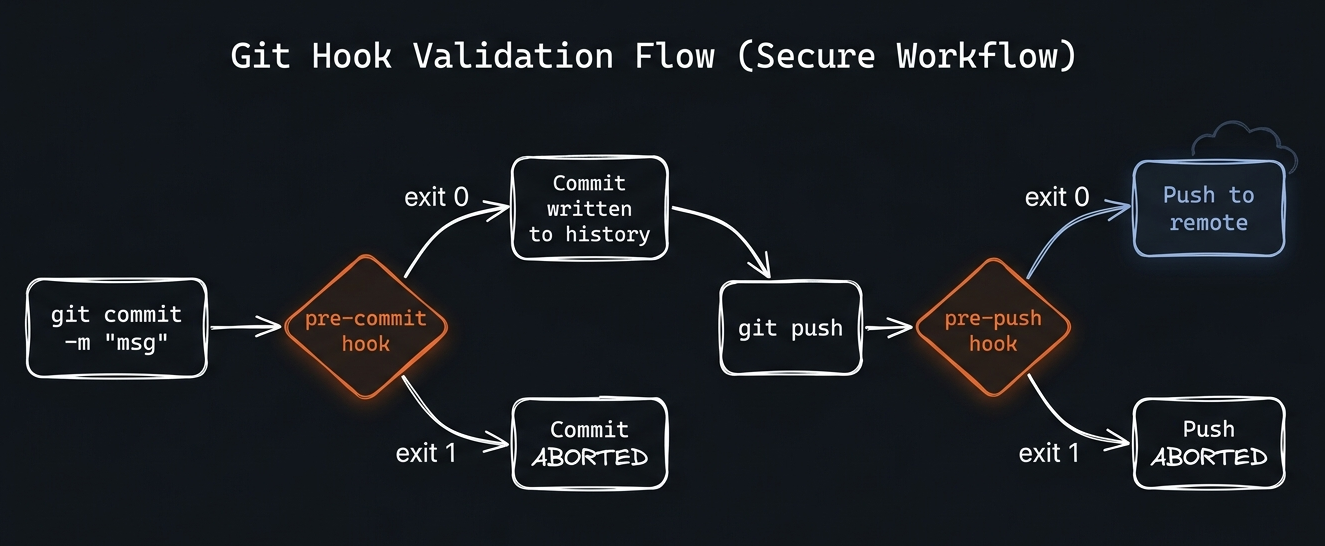
Figure 1: Git hooks intercept operations at key lifecycle points. Pre-commit runs before the commit is written; pre-push runs before remote communication begins.
The 10 Git Hook Types You'll Actually Use
| Flag | Type | Default | Description |
|---|---|---|---|
pre-commit | hook | all stages | Runs before a commit is created. Most common hook for linters, formatters, and secret scanners. Receives no arguments — inspect staged files yourself. |
pre-push | hook | all stages | Runs before |
commit-msg | hook | — | Receives the commit message file as an argument. Use for enforcing conventional commits, ticket numbers, or message length. |
prepare-commit-msg | hook | — | Runs before the commit message editor opens. Use to auto-populate branch name or ticket ID. |
post-commit | hook | — | Runs after a commit succeeds. Cannot abort the commit. Useful for notifications or local bookkeeping. |
pre-merge-commit | hook | — | Runs after a merge succeeds but before the merge commit is created. Requires Git 2.24+. |
pre-rebase | hook | — | Runs before a rebase. A non-zero exit cancels the rebase. |
post-checkout | hook | — | Runs after a branch switch. Useful for updating dependencies or environment variables per branch. |
post-merge | hook | — | Runs after a successful |
pre-receive | hook | server-side | Server-side hook. Runs on the remote before accepting a push. The last line of defense. |
The Problem With Raw Git Hooks
Raw hooks work, but they have three painful limitations:
1. They don't version control. .git/hooks/ is not tracked by Git. Every new clone starts with no hooks. Every teammate has to set them up manually.
2. They don't share dependencies. If your hook calls ruff, ruff must be installed. Your hook can't install it for the user. Different machines get different behavior.
3. They're not portable. A bash script that works on macOS may break on Windows or Linux.
This is exactly the problem pre-commit and prek were built to solve.
pre-commit: The Hook Framework Standard
pre-commit is a framework that manages hooks as versioned, installable packages. You declare what hooks you want in a .pre-commit-config.yaml file — which you do commit — and the framework handles downloading, installing, and caching every hook's dependencies automatically.
# Install pre-commit itself (one-time, per machine)
pip install pre-commit
# or: brew install pre-commit

# Install hooks into .git/hooks/ (one-time, per clone)
pre-commit install

# Also install pre-push hooks
pre-commit install --hook-type pre-push
The Configuration File
Everything lives in .pre-commit-config.yaml at your repository root. This file is committed to Git, so every contributor gets the same hooks automatically.
# .pre-commit-config.yaml
default_install_hook_types: [pre-commit, pre-push]

repos:
  - repo: https://github.com/some-org/some-hook
    rev: v1.2.3          # always pin to a tag, never a branch
    hooks:
      - id: the-hook-id
        args: [--extra-flag]
The framework clones repo at rev, reads the .pre-commit-hooks.yaml manifest inside it, installs the hook's dependencies (Python venv, Node modules, Rust binary — whatever the language field specifies), and caches everything in ~/.cache/pre-commit/. The cache is reused on every subsequent commit.
Run pre-commit run --all-files at any time to manually run all hooks against every file in the repo — not just staged ones. This is the standard CI invocation.
prek: The Rust Reimplementation
 prekv0.3.6+·Rust-native, no Python required
prek by j178 is a Rust reimplementation of pre-commit. It reads the exact same .pre-commit-config.yaml and .pre-commit-hooks.yaml format — you can drop it in as a zero-config replacement.
Why choose prek?
- ›No Python dependency. A single Rust binary. Works everywhere without a Python environment.
- ›2–5x faster hook installation. Repositories are cloned and environments installed in parallel.
- ›Hooks run in parallel by default (configurable
priorityfield). - ›Better Rust toolchain support. Understands semver ranges for
language_version.
# Install prek (macOS/Linux)
curl -fsSL https://prek.j178.dev/install.sh | sh

# or via Cargo
cargo install prek

# Install git hooks (same command as pre-commit)
prek install
Same config, two tools. Your .pre-commit-config.yaml works with both pre-commit and prek unchanged. Teams can choose their preferred runner without any config changes.
How Hook Installation Works — The Full Lifecycle
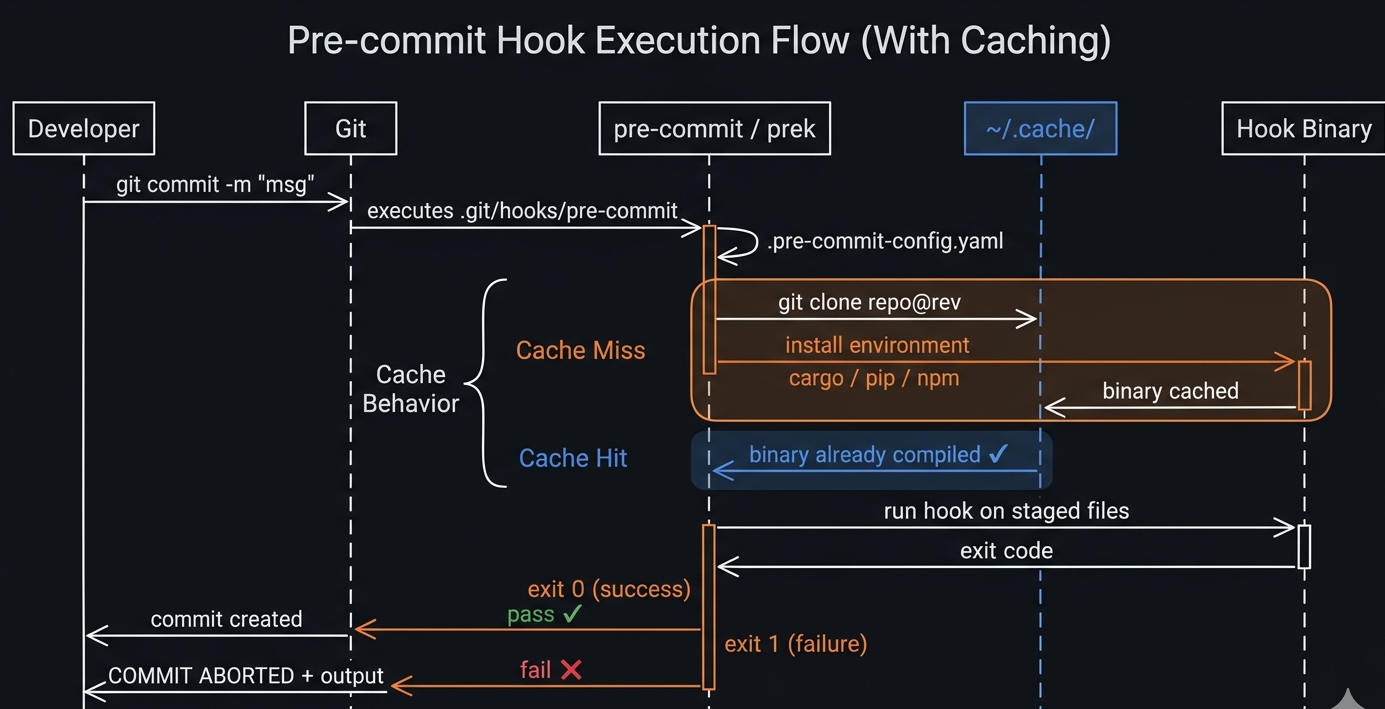
Figure 2: On the first commit, the framework clones the hook repo, compiles the binary via Cargo, and caches it. Every subsequent commit hits the cache and runs in milliseconds.
The first commit on a new machine will be slow — 30–90 seconds — because the hook's environment is compiled or installed. Every subsequent commit uses the cache and takes milliseconds. This is expected and normal.
Popular Hooks Worth Adding Today
Here are the hooks used by serious projects. Each entry shows exactly how to add it to your config.
Python: ruff (linting + formatting)
ruff is the fastest Python linter and formatter. Written in Rust.
repos:
  - repo: https://github.com/astral-sh/ruff-pre-commit
    rev: v0.4.4
    hooks:
      - id: ruff           # linting — fixes auto-fixable issues
        args: [--fix]
      - id: ruff-format    # formatting (replaces black)
Python: mypy (type checking)
repos:
  - repo: https://github.com/pre-commit/mirrors-mypy
    rev: v1.10.0
    hooks:
      - id: mypy
        additional_dependencies: [types-requests, types-PyYAML]
JavaScript/TypeScript: eslint + prettier
repos:
  - repo: https://github.com/pre-commit/mirrors-eslint
    rev: v9.3.0
    hooks:
      - id: eslint
        files: \.(js|ts|jsx|tsx)$
        additional_dependencies:
          - eslint@9.3.0
          - "@typescript-eslint/parser@7.0.0"
          - "@typescript-eslint/eslint-plugin@7.0.0"

  - repo: https://github.com/pre-commit/mirrors-prettier
    rev: v4.0.0-alpha.8
    hooks:
      - id: prettier
        types_or: [javascript, typescript, css, json, yaml, markdown]
Rust: cargo fmt + clippy
repos:
  - repo: https://github.com/doublify/pre-commit-rust
    rev: v1.0
    hooks:
      - id: fmt        # cargo fmt --all
      - id: clippy     # cargo clippy -- -D warnings
General file quality (pre-commit-hooks)
The official pre-commit-hooks repo covers the basics every project needs:
repos:
  - repo: https://github.com/pre-commit/pre-commit-hooks
    rev: v4.6.0
    hooks:
      - id: trailing-whitespace     # remove trailing spaces
      - id: end-of-file-fixer       # ensure files end with newline
      - id: check-yaml              # validate YAML syntax
      - id: check-json              # validate JSON syntax
      - id: check-toml              # validate TOML syntax
      - id: check-merge-conflict    # catch leftover merge markers
      - id: check-added-large-files # block files > 500KB by default
        args: [--maxkb=500]
      - id: detect-private-key      # catch raw PEM private keys
      - id: no-commit-to-branch     # protect main/master
        args: [--branch, main, --branch, master]
Conventional Commits: commitizen
repos:
  - repo: https://github.com/commitizen-tools/commitizen
    rev: v3.27.0
    hooks:
      - id: commitizen
        stages: [commit-msg]    # runs on the commit message, not files
evnx: Protecting Your .env Files Automatically
.env files are the most common vector for credential leaks. AWS Access Keys, Stripe live keys, database passwords, OpenAI API keys — they all end up in .env files, and .env files end up in commits. evnx prevents this at the source.
evnx is a Rust CLI built specifically for .env file management: validation, secret scanning, format conversion, drift detection, and encrypted backups. It ships a .pre-commit-hooks.yaml manifest, which means you can use it as a first-class pre-commit provider — no manual evnx installation required.
How evnx Hooks Install Themselves
Because evnx declares language: rust in its hook manifest, pre-commit and prek handle everything:
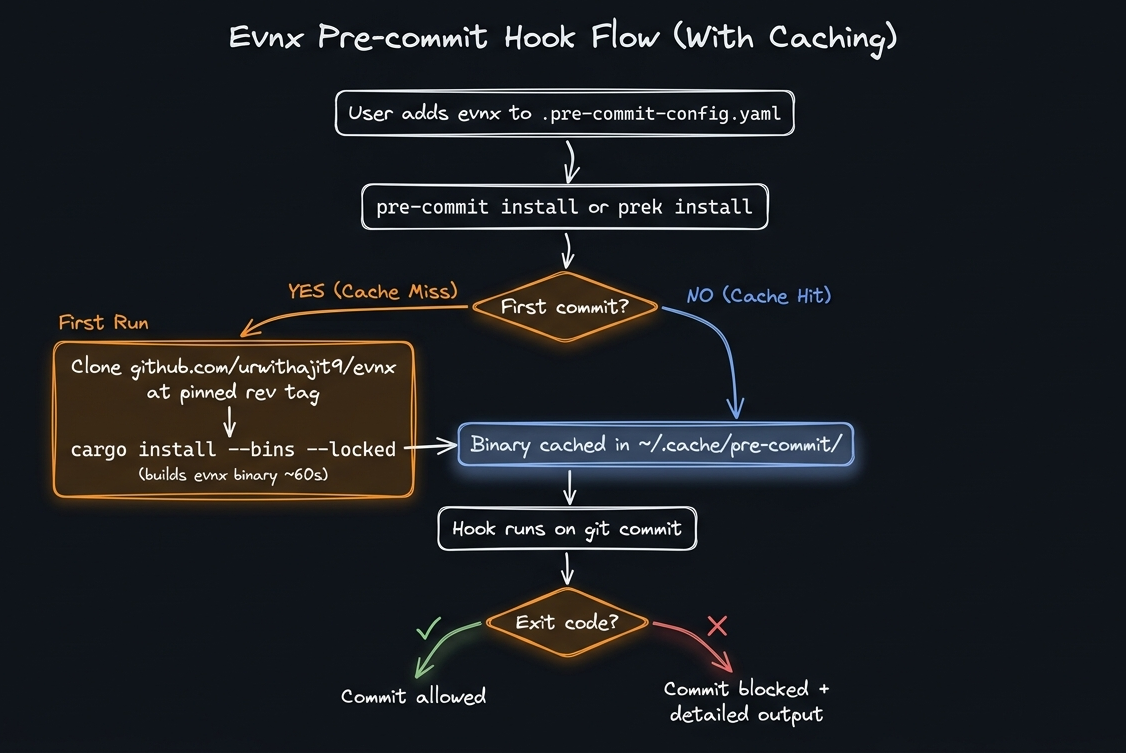
Figure 3: Installation process fo evnx Hooks : How evnx Hooks Install Themselves
Drop-in Config: Add evnx to Any Project in 3 Lines
Add this to your .pre-commit-config.yaml:
repos:
  - repo: https://github.com/urwithajit9/evnx
    rev: v0.2.0
    hooks:
      - id: evnx-scan       # blocks commit if secrets found
      - id: evnx-validate   # blocks commit if .env misconfigured
Then install:
# pre-commit
pre-commit install && pre-commit install --hook-type pre-push

# prek (installs all stages from default_install_hook_types)
prek install
The Five evnx Hooks — What Each One Catches
| Flag | Type | Default | Description |
|---|---|---|---|
evnx-scan | pre-commit | always_run | Secret detection using pattern matching and entropy analysis. Catches AWS
Access Keys ( |
evnx-validate | pre-commit | *.env* | Validates |
evnx-diff | pre-commit | warn | Compares |
evnx-doctor | pre-commit | warn | Checks that |
evnx-scan-push | pre-push | always_run | Same secret detection as |
Live Demo: What Each Scenario Looks Like
Clean commit — everything passes
$ git commit -m "feat: add payment service" evnx — Secret Scanner.......................................Passed [0.08s]evnx — .env Validator.......................................Passed [0.06s]evnx — .env Drift Check.....................................Passed [0.04s][main a1b2c3] feat: add payment service 2 files changed, 47 insertions(+)
Blocked — Stripe live key detected
$ git add .env && git commit -m "add stripe" evnx — Secret Scanner.......................................Failed- hook id: evnx-scan- exit code: 1 Scanning for secrets... CRITICAL .env:7 Stripe Live Secret Key Value: sk_live_4xTruePro*** 1 secret(s) found. Commit blocked.
Blocked — placeholder values in .env
$ git commit -m "initial config" evnx — Secret Scanner.......................................Passedevnx — .env Validator.......................................Failed- hook id: evnx-validate- exit code: 1 ERROR DB_PASSWORD = "CHANGE_ME" placeholder value detected ERROR SECRET_KEY = "dev" weak secret (3 chars, min: 32) WARN DATABASE_URL contains localhost 2 error(s), 1 warning(s). Commit blocked (strict mode).
Push — SARIF scan before remote
$ git push origin main evnx — Secret Scan (pre-push)..............................Passed SARIF report: 0 findings across 14 files. Push allowed. To github.com:yourorg/yourrepo.git a1b2c3..d4e5f6 main -> main
Configuring evnx via .evnx.toml
You can tune evnx behavior per-project without touching the hook args:
# .evnx.toml — commit this file
[defaults]
env_file = ".env"
example_file = ".env.example"

[validate]
strict = true          # treat warnings as errors

[scan]
ignore_placeholders = true
exclude_patterns = [
  "*.example",
  "*.sample",
  ".env.test"          # exclude test fixtures from scanning
]
Emergency Escape Hatch
When you genuinely need to skip a check (rare — document why):
# Skip a specific hook
SKIP=evnx-scan git commit -m "wip: local only"

# Skip all hooks (last resort)
git commit --no-verify -m "hotfix: production down"
Use --no-verify only in true emergencies. If you find yourself using it regularly, the hooks are too strict — tune them in .evnx.toml instead.
Building Your Own pre-commit Compatible Tool
One of the best parts of the ecosystem is that any CLI can become a hook provider. Here's a complete walkthrough using a fictional Rust CLI called env-guard as the example — the same pattern used by evnx.
What Makes a Tool a Hook Provider?
A repository is a pre-commit hook provider when it has:
- ›A
.pre-commit-hooks.yamlfile at the repo root - ›A way for the framework to install the tool (
languagefield) - ›A binary or script that exits non-zero on failure
That's it.
Step 1: Project Structure
my-cli/├── .pre-commit-hooks.yaml ← hook manifest (new)├── .pre-commit-config.yaml ← dogfood: use your own hooks (new)├── Cargo.toml├── Cargo.lock├── src/│ └── main.rs└── tests/ └── integration_test.rs
Step 2: Write the CLI With Proper Exit Codes
The most important contract: exit non-zero when something is wrong.
// src/main.rs
use std::process;

fn main() {
    let args: Vec<String> = std::env::args().collect();
    let result = run(&args);

    match result {
        Ok(findings) if findings == 0 => {
            println!("No issues found.");
            process::exit(0);  // pre-commit sees this as PASS
        }
        Ok(findings) => {
            eprintln!("{} issue(s) found.", findings);
            process::exit(1);  // pre-commit sees this as FAIL, blocks commit
        }
        Err(e) => {
            eprintln!("Error: {}", e);
            process::exit(2);  // framework treats non-zero as failure
        }
    }
}

fn run(args: &[String]) -> Result<usize, String> {
    // Your validation logic here.
    // Return Ok(0) for clean, Ok(n) for n findings, Err for runtime errors.
    todo!()
}
Exit codes are the entire contract. pre-commit and prek only care about exit 0 (pass) vs non-zero (fail). Print your human-readable output to stdout/stderr freely — the framework captures and shows it to the user on failure.
Step 3: Write the Hook Manifest
# .pre-commit-hooks.yaml
- id: my-cli-check
  name: my-cli — Default Check
  description: Describe what this hook catches in one sentence.
  entry: my-cli check        # binary name, as produced by Cargo
  language: rust             # framework runs: cargo install --bins --locked
  pass_filenames: false      # set true if your tool takes file arguments
  always_run: true           # run even if no files match
  stages: [pre-commit]

- id: my-cli-strict
  name: my-cli — Strict Mode
  description: Same check with strict flag — fails on warnings too.
  entry: my-cli check --strict
  language: rust
  pass_filenames: false
  stages: [pre-commit]

- id: my-cli-push
  name: my-cli — Pre-push Check
  description: Heavier check that runs on git push, not every commit.
  entry: my-cli check --full
  language: rust
  pass_filenames: false
  always_run: true
  stages: [pre-push]
Key language options for CLI tools:
| Language | When to use | What the framework runs |
|---|---|---|
rust | Rust binary with Cargo.toml | cargo install --bins --locked |
python | Python with pyproject.toml or setup.py | pip install . |
node | Node.js with package.json | npm install . |
golang | Go with source files | go install ./... |
system | Binary must already exist in PATH | Nothing — user must pre-install |
Step 4: Validate the Manifest
Before committing, always validate your manifest:
# Validate syntax and schema
pre-commit validate-manifest .pre-commit-hooks.yaml

# prek equivalent
prek validate-manifest .pre-commit-hooks.yaml
$ pre-commit validate-manifest .pre-commit-hooks.yamlValidating .pre-commit-hooks.yaml....pre-commit-hooks.yaml is valid (3 hook definitions)
Step 5: Test Locally With try-repo
try-repo simulates what end users will experience — it clones your local repo (including uncommitted changes) and runs the hooks against a target project. Always test this before pushing a release tag.
# Test from a URL
pre-commit try-repo https://github.com/your-org/my-cli my-cli-check \
  --all-files \
  --verbose

# Test from a local path (faster, no git push needed)
pre-commit try-repo /path/to/my-cli my-cli-check --all-files --verbose

# prek equivalent
prek try-repo /path/to/my-cli my-cli-check --all-files --verbose
$ pre-commit try-repo ../my-cli my-cli-check --all-files --verbose ===============================================================================Using config:===============================================================================repos:- repo: ../my-cli rev: 84f01ac09fcd8610824f9626a590b83cfae9bcbd hooks: - id: my-cli-check===============================================================================[INFO] Initializing environment for ../my-cli. cargo install --bins --locked --path ../my-cli Compiling my-cli v0.1.0 ... Finished in 38s (cached for future runs) my-cli — Default Check..........................................Passed- hook id: my-cli-check- duration: 0.09s No issues found.
Step 6: Write Integration Tests for the Hook Behavior
Don't just unit test your logic — test the exit code contract explicitly.
// tests/integration_test.rs
use std::process::Command;
use std::fs;
use tempfile::TempDir;

fn run_my_cli(args: &[&str], dir: &std::path::Path) -> std::process::Output {
    Command::new(env!("CARGO_BIN_EXE_my-cli"))
        .args(args)
        .current_dir(dir)
        .output()
        .expect("failed to execute binary")
}

#[test]
fn test_clean_file_exits_zero() {
    let dir = TempDir::new().unwrap();
    fs::write(
        dir.path().join(".env"),
        "DATABASE_URL=postgres://localhost/dev\nDEBUG=true\n"
    ).unwrap();

    let output = run_my_cli(&["check"], dir.path());

    // pre-commit contract: exit 0 = pass
    assert_eq!(output.status.code(), Some(0), "expected exit 0 for clean file");
}

#[test]
fn test_placeholder_exits_nonzero() {
    let dir = TempDir::new().unwrap();
    fs::write(dir.path().join(".env"), "SECRET_KEY=CHANGE_ME\n").unwrap();

    let output = run_my_cli(&["check"], dir.path());

    // pre-commit contract: non-zero = fail, commit blocked
    assert_ne!(output.status.code(), Some(0), "expected non-zero for placeholder");
    let stderr = String::from_utf8_lossy(&output.stderr);
    assert!(stderr.contains("placeholder"), "error message should mention placeholder");
}

#[test]
fn test_strict_mode_fails_on_warnings() {
    let dir = TempDir::new().unwrap();
    fs::write(
        dir.path().join(".env"),
        "DATABASE_URL=postgres://localhost/prod\n"
    ).unwrap();

    let normal = run_my_cli(&["check"], dir.path());
    let strict = run_my_cli(&["check", "--strict"], dir.path());

    assert_eq!(normal.status.code(), Some(0));  // warning, pass in normal mode
    assert_ne!(strict.status.code(), Some(0));  // warning, fail in strict mode
}# Run integration tests
cargo test --test integration_test
# Run all tests
cargo test
# Test the compiled binary end-to-end
cargo build
./target/debug/my-cli check
echo $? # should print 0 on a clean projectStep 7: Dogfood Your Own Hook
Your tool should protect itself. Use repo: local with cargo run -- to avoid the circular dependency of referencing your own GitHub URL:
# .pre-commit-config.yaml (in your tool's repo)
repos:
  - repo: local
    hooks:
      - id: my-cli-self-check
        name: my-cli — Self Check (dev)
        entry: cargo run -- check
        language: rust
        pass_filenames: false
always_run: true# Install and test on your own repo
pre-commit install
git add .pre-commit-hooks.yaml .pre-commit-config.yaml
git commit -m "feat: add pre-commit hook support"
# Your hook runs on this very commitStep 8: Publish and Tag a Release
Once your manifest is tested, push and tag. The tag is essential — users pin rev: to it, and both frameworks use it as a cache key.
git push origin feat/pre-commit-support
# create PR, review, merge

# Tag the release
git tag v0.2.0 -m "Add pre-commit hook support"
git push origin v0.2.0
Users can now reference your hook:
repos:
  - repo: https://github.com/your-org/my-cli
    rev: v0.2.0
    hooks:
      - id: my-cli-check
Add pre-commit autoupdate or prek auto-update to your release checklist. Users can run it to bump their pinned rev to your latest tag automatically.
Complete .pre-commit-config.yaml for a Real Project
Here's what a production Python, Rust, or Node.js project looks like with the full suite — including evnx for .env protection:
# .pre-commit-config.yaml
default_install_hook_types: [pre-commit, pre-push]

repos:
  # General file hygiene
  - repo: https://github.com/pre-commit/pre-commit-hooks
    rev: v4.6.0
    hooks:
      - id: trailing-whitespace
      - id: end-of-file-fixer
      - id: check-yaml
      - id: check-toml
      - id: check-merge-conflict
      - id: check-added-large-files
        args: [--maxkb=500]
      - id: no-commit-to-branch
        args: [--branch, main]

  # Python: lint + format
  - repo: https://github.com/astral-sh/ruff-pre-commit
    rev: v0.4.4
    hooks:
      - id: ruff
        args: [--fix]
      - id: ruff-format

  # Python: type checking
  - repo: https://github.com/pre-commit/mirrors-mypy
    rev: v1.10.0
    hooks:
      - id: mypy
        additional_dependencies: [types-requests]

  # Commit message
  - repo: https://github.com/commitizen-tools/commitizen
    rev: v3.27.0
    hooks:
      - id: commitizen
        stages: [commit-msg]

  # .env protection (evnx)
  - repo: https://github.com/urwithajit9/evnx
    rev: v0.2.0
    hooks:
      - id: evnx-scan
      - id: evnx-validate
      - id: evnx-diff
      - id: evnx-scan-push
Quick Reference
Summary
# Before: hoping developers remember to check manually- git commit -m "add payment integration"- # ... CI fails 20 minutes later- # ... or worse: AWS alert at 3am + # After: automatic protection on every commit+ git commit -m "add payment integration"+ # evnx — Secret Scanner ................ Passed+ # evnx — .env Validator ................ Passed+ # ruff (lint) .......................... Passed+ # ruff (format) ........................ Passed+ # [main a1b2c3] add payment integration
Git hooks give you interception points. pre-commit and prek give you a portable, versionable, zero-setup way to use them across every machine and every contributor. evnx gives you .env-specific intelligence that generic scanners miss.
The entire setup takes about five minutes. The incident it prevents could cost you hours — or a very uncomfortable conversation with your development head.