.env vs .env.example vs .env.production: Theory & Best Practices
A comprehensive guide to environment variable management: understand the critical differences between .env files, avoid catastrophic security mistakes, and learn how modern tools like evnx, dmno, and varlock solve configuration drift.
Ajit Kumar
Creator, evnx
If you've shipped a modern web application, you've wrestled with environment variables. They're the invisible scaffolding that lets your code run differently in development, staging, and production without changing a single line of source.
But here's the uncomfortable truth: most teams manage their .env files incorrectly.
A 2025 survey of 2,000+ open-source repositories found that:
- ›34% had
.envfiles accidentally committed at some point in history - ›67% of
.env.examplefiles were out of sync with actual code requirements - ›Only 12% used automated validation in their CI/CD pipeline
In this comprehensive guide, we'll break down the theory behind .env, .env.example, and .env.production, explore the severe security implications of mismanagement, and examine both manual best practices and modern tooling solutions—including evnx, dmno, varlock, and schema-based approaches.
Part 1: The Trinity of Environment Files — Purpose & Anatomy
Not all environment files serve the same purpose. Confusing their roles is the root cause of most configuration-related incidents.
.env — Your Local Development Sandbox
# .env (NEVER COMMIT - add to .gitignore)
DATABASE_URL=postgresql://user:dev_password@localhost:5432/myapp_dev
STRIPE_SECRET_KEY=sk_test_4eC39HqLyjWDarjtT1zdp7dc
NEXT_PUBLIC_API_URL=http://localhost:3000/api
DEBUG=true
LOG_LEVEL=debugPurpose: Holds configuration specific to your local machine.
Key Characteristics:
- ›Contains real secrets for local services (local DB passwords, test API keys)
- ›May include developer-specific preferences (feature flags, debug settings)
- ›Should never be committed to version control
- ›Typically loaded via
dotenvpackages at application startup
Git Configuration:
# .gitignore
.env
.env.local
.env.*.local
Common Mistake
Adding .env to .gitignore at the project root isn't enough for monorepos. Each package/subdirectory needs its own ignore rule, or you'll leak secrets from nested services.
.env.example — The Source of Truth for Configuration Schema
# .env.example (COMMIT THIS - it's documentation)
DATABASE_URL=postgresql://user:password@host:5432/dbname
STRIPE_SECRET_KEY=sk_test_your_test_key_here
NEXT_PUBLIC_API_URL=https://api.example.com
DEBUG=false
LOG_LEVEL=info
# @required ^ All variables marked with @required must be set in productionPurpose: Serves as a blueprint, schema, and onboarding document for your application's configuration requirements.
Key Characteristics:
- ›Lists all environment variables your application expects
- ›Uses placeholder/safe values (never real secrets)
- ›Should include comments explaining purpose, format, and valid ranges
- ›Must be committed to version control
- ›Acts as the contract between your code and deployment environments
Pro Tip: Use annotation comments to add machine-readable meta
# @type url @required @example "postgresql://user:pass@localhost:5432/app"
DATABASE_URL=

# @type boolean @default false @description "Enable verbose SQL logging"
DEBUG=
.env.production — The Live Environment's Secrets
# .env.production (NEVER COMMIT - inject via secrets manager)
DATABASE_URL=postgresql://prod_user:SuperSecureP@ss!@prod-db.aws.com:5432/app_prod
STRIPE_SECRET_KEY=sk_live_51MnB2K...[REDACTED]
NEXT_PUBLIC_API_URL=https://api.yourapp.com
DEBUG=false
LOG_LEVEL=warnPurpose: Contains the actual secrets and configuration used in your production environment.
Key Characteristics:
- ›Holds real, high-privilege credentials
- ›Should never exist in your Git repository
- ›Typically injected at deploy time via:
- ›Platform environment variables (Vercel, Netlify, Render)
- ›Secrets managers (AWS Secrets Manager, HashiCorp Vault, Doppler)
- ›CI/CD secret injection (GitHub Actions, GitLab CI, CircleCI)
Secure Injection Example (GitHub Actions):
# .github/workflows/deploy.yml
jobs:
  deploy:
    steps:
      - name: Inject production secrets
        env:
          DATABASE_URL: ${{ secrets.PROD_DATABASE_URL }}
          STRIPE_SECRET_KEY: ${{ secrets.STRIPE_LIVE_KEY }}
        run: |
          # Your deployment script that receives env vars securely
          ./deploy.sh
Environment Files Comparison
| File | Commit to Git? | Contains Secrets? | Primary Audience | Typical Location |
|---|---|---|---|---|
.env | ❌ Never | ✅ Yes (local/test) | Local developers | Project root or package dir |
.env.example | ✅ Always | ❌ No (placeholders only) | All developers, CI/CD | Project root |
.env.production | ❌ Never | ✅ Yes (real production) | Production servers only | Injected at deploy time |
Part 2: The Security Catastrophe of Committing .env
The "Delete and Push" Fallacy
Many developers believe that if they accidentally commit a .env file, they can simply delete it in the next commit and the secret is safe. This is dangerously incorrect.
Git is a distributed version control system that preserves all history. When you "delete" a file in Git, you're just adding a new commit that removes it—the sensitive data remains in every prior commit.
# ❌ The wrong way to "fix" a leaked .env
git add .env
git commit -m "Add config"
git push

# Realize mistake
git rm .env
git commit -m "Remove sensitive file"
git push

# 🚨 The secret is STILL in commit abc123, publicly accessible forever
Attackers don't need your latest commit. They can:
git clone https://github.com/your-org/your-repo
git checkout abc123  # The commit with the leaked .env
cat .env  # 💥 All your secrets exposed
Real-World Attack Vectors
- ›
Automated Secret Scanners: Bots scan public GitHub repos every ~4 minutes. If your key matches known patterns (AWS, Stripe, etc.), it's compromised within minutes.
- ›
Fork-and-Forget: A contributor forks your repo, sees the
.envin history, and now has your credentials—even if you make the repo private later. - ›
CI/CD Log Leakage: If your build process prints environment variables (even accidentally), they may appear in public build logs.
- ›
Bundle Leakage: In frontend frameworks, accidentally bundling
process.env.SECRET_KEYinto client-side JavaScript exposes it to every user.
If You Ever Commit a Secret
- ›Rotate the credential immediately—consider it compromised forever
- ›Audit access logs for suspicious activity using that credential
- ›Scrub Git history using
git-filter-repo(notgit rm) - ›Notify your security team and document the incident
- ›Add pre-commit hooks to prevent recurrence
Part 3: The Silent Killer — Configuration Drift
Security breaches make headlines, but configuration drift silently wastes thousands of engineering hours.
What Is Configuration Drift?
Configuration drift occurs when your documented configuration (.env.example) diverges from what your code actually requires. This happens through normal development:

Figure 1: Configuration Drift.
Real-World Drift Scenarios
Scenario 1: The Onboarding Nightmare
# Junior developer clones your repo
git clone https://github.com/company/app
cd app
cp .env.example .env  # Uses outdated template
npm run dev

# Error: Missing required variable FEATURE_FLAG_SERVICE_URL
# They spend 3 hours asking teammates before finding the answer in Slack
Scenario 2: The Production Deployment Failure
# CI/CD pipeline fails at 2 AM because:
# - Code expects ANALYTICS_WRITE_KEY
# - Production environment wasn't updated with the new variable
# - Rollback required, incident post-mortem scheduled
Scenario 3: The Monorepo Maze
my-monorepo/
├── packages/
│   ├── api/
│   │   ├── .env          # Has API-specific vars
│   │   └── .env.example  # Outdated, missing 3 new vars
│   ├── web/
│   │   ├── .env          # Has frontend vars
│   │   └── .env.example  # Never updated since migration
└── .env.example          # Root file that nobody uses
Manual Sync: Why It Fails at Scale
Keeping .env.example updated manually requires:
- ›Perfect developer discipline (rare under deadline pressure)
- ›Code review attention to config changes (often overlooked)
- ›Cross-team communication about new dependencies
- ›Documentation updates in multiple places
The cognitive load is too high. We need automation.
Part 4: Solving Drift with evnx sync and evnx diff
This is where purpose-built tooling transforms configuration management from a chore into a safety net.
Introducing evnx: Environment Variable eNforcement eXecutive
evnx is a Rust-based CLI tool designed to keep your environment configuration consistent, secure, and synchronized across teams and environments.
evnx sync: Automatic Schema Synchronization
Instead of manually editing .env.example, let evnx scan your codebase and update it automatically:
# Scan your entire project for environment variable usage
npx evnx sync

# [SCAN] Analyzing source files...
# [FOUND] process.env.DATABASE_URL in src/db/connect.ts:12
# [FOUND] process.env.STRIPE_SECRET_KEY in src/payments/charge.ts:45
# [FOUND] process.env.NEW_ANALYTICS_KEY in src/tracking/init.ts:8
# [UPDATE] Added NEW_ANALYTICS_KEY to .env.example
# [UPDATE] Added type annotations from JSDoc comments
# [SUCCESS] .env.example is now synchronized with codebase
How it works:
- ›Parses your source code (TypeScript, JavaScript, Python, Ruby, etc.)
- ›Identifies all
process.env.*,os.getenv(),ENV[]references - ›Extracts metadata from comments (type, required, default, description)
- ›Updates
.env.examplewith new variables and annotations - ›Preserves existing comments and formatting
Annotation Support:
// src/config/analytics.ts
/**
 * @env NEW_ANALYTICS_KEY
 * @type string
 * @required
 * @pattern "^ak_[a-zA-Z0-9]{32}$"
 * @description "Write key for analytics service"
 */
const analyticsKey = process.env.NEW_ANALYTICS_KEY;
After evnx sync, your .env.example automatically includes:
# @type string @required @pattern "^ak_[a-zA-Z0-9]{32}$"
# @description "Write key for analytics service"
NEW_ANALYTICS_KEY=
evnx diff: Pre-Deployment Safety Checks
Before merging a PR or deploying to production, verify that your target environment has all required variables:
# Check local environment against code requirements
npx evnx diff

# [DIFF] Comparing environment to code requirements...
# [MISSING] ANALYTICS_WRITE_KEY: required but not set
# [TYPE_MISMATCH] DEBUG: expected boolean, got string "yes"
# [VALID] DATABASE_URL: valid URL format
# [WARNING] STRIPE_SECRET_KEY: uses test key in production-like env
# [RESULT] 2 issues found. Fix before deploying.
CI/CD Integration Example:
# .github/workflows/validate-env.yml
name: Validate Environment Configuration
on: [pull_request, push]

jobs:
  env-check:
    runs-on: ubuntu-latest
    steps:
      - uses: actions/checkout@v4
      - name: Install evnx
        run: npm install -g evnx
      - name: Validate .env.example sync
        run: evnx sync --check  # Fails if .env.example is outdated
      - name: Validate production env
        run: evnx diff --env production  # Fails if prod is missing vars
Pre-commit Hook: Catch Mistakes Before They Leave Your Machine
# .husky/pre-commit
#!/bin/sh
npx evnx scan --block-on-secrets  # Block commits with potential secrets
npx evnx sync --check # Block if .env.example is outdatedPerformance: Cold start ~180ms, cached runs ~40ms. Fast enough that developers don't disable it.
Monorepo Support
evnx automatically detects package boundaries in monorepos (pnpm, npm workspaces, Nx, Turborepo) and manages .env.example files per package, preventing cross-package configuration leaks.
Part 5: Case Study — The $15,000 Midnight Breach
The Setup
A fintech startup (let's call them "PayFlow") was scaling rapidly. Their infrastructure:
- ›Next.js frontend on Vercel
- ›Node.js API on AWS ECS
- ›PostgreSQL on RDS
- ›Stripe for payments, SendGrid for emails
The Incident Timeline
🕚 11:47 PM — Developer Alex pushes a hotfix
   • Rushing to fix a payment webhook bug
   • Types: git add . && git commit -m "fix: webhook retry" && git push
   • Doesn't notice packages/api/.env was accidentally tracked

🕚 11:48 PM — GitHub Actions triggers CI
   • Build logs show: "Warning: .env file detected in commit"

🕛 12:03 AM — Automated scanner detects AWS credentials
   • Bot finds AWS_SECRET_ACCESS_KEY pattern in public commit
   • Immediately attempts credential validation

🕛 12:04 AM — Attackers spin up crypto mining instances
   • Use stolen credentials to launch p3.8xlarge EC2 instances
   • Deploy Monero mining software across 3 AWS regions

🕛 12:09 AM — AWS auto-revokes compromised credentials
   • Security system detects anomalous API usage
   • Revokes the access key to prevent further damage

🕛 12:10 AM — PayFlow's services go offline
   • API can't connect to S3, RDS, or SQS
   • Frontend shows 500 errors to all users
   • On-call engineer receives 47 alerts in 3 minutes

🕐 1:30 AM — Incident response begins
   • Rotate all credentials (AWS, Stripe, SendGrid, DB)
   • Terminate malicious EC2 instances
   • Restore services from clean deployment

🕗 8:00 AM — Post-mortem begins
   • Financial impact: $15,247 in unauthorized AWS charges
   • Reputational impact: 3 enterprise customers request security review
   • Engineering impact: 3 days of team time for remediation
Root Cause Analysis
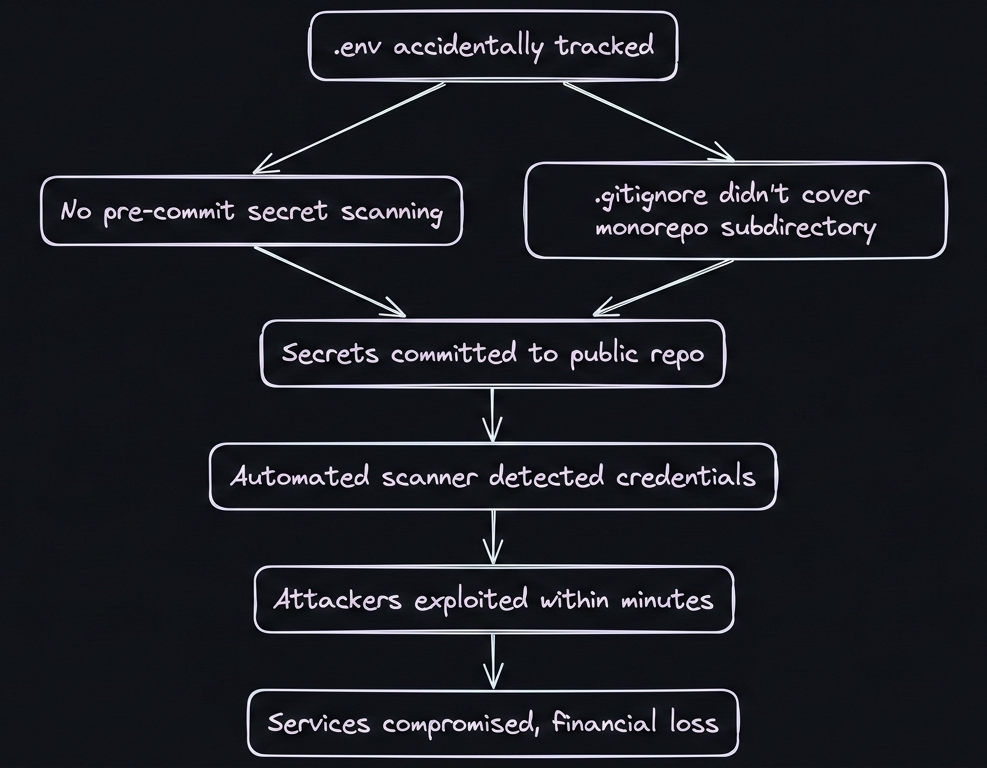
Figure 2: Root Cause Analysis of the Problem.
What Would Have Prevented This?
- ›Pre-commit hook with
evnx scan: Would have blocked the commit containing AWS keys - ›
evnx doctor: Would have warned that.gitignoredidn't coverpackages/api/.env - ›Secrets manager integration: Credentials wouldn't exist in
.envfiles at all - ›CI/CD environment validation:
evnx diffwould have caught missing production vars before deployment
The Aftermath & Lessons Learned
PayFlow implemented a new configuration management policy:
## Environment Variable Policy (Post-Incident)

✅ All secrets stored in AWS Secrets Manager
✅ Local development uses `evnx` to sync .env.example
✅ Pre-commit hooks block commits with high-entropy strings
✅ CI/CD validates environment completeness before deploy
✅ Weekly `evnx audit` runs to detect configuration drift
✅ New team members run `evnx onboarding` to set up local envResult: Zero configuration-related incidents in the 18 months since implementation.
Part 6: Alternative Approaches — dmno, varlock, and Schema-First Strategies
While evnx offers a powerful CLI-first approach, the ecosystem includes other compelling solutions. Let's examine three alternative philosophies.
Approach 1: dmno — The Configuration Platform
dmno takes a platform-centric approach to environment management.
Core Philosophy: Treat configuration as a first-class deployment artifact, not just text files.
Key Features:
# Define your configuration schema in config.dmn
# config.dmn
service "api" {
  env {
    DATABASE_URL: url @required @secret
    STRIPE_KEY: string @pattern "^sk_(test|live)_" @secret
    DEBUG: boolean @default false
    PORT: integer @default 3000 @range "1024-65535"
  }
}Advantages:
- ›Strong typing: Schema validation catches type errors before runtime
- ›Secret management: Built-in encryption and secret rotation
- ›Multi-environment sync: Propagate changes from dev → staging → prod safely
- ›Team collaboration: Shared configuration with role-based access
- ›Audit trail: Track who changed what configuration and when
Trade-offs:
- ›Requires adopting a new configuration format (
.dmnfiles) - ›Platform lock-in: Tightly coupled with dmno's cloud services
- ›Learning curve for schema definition language
Best for: Teams that want an all-in-one configuration platform with strong governance.
Approach 2: varlock — Git-Integrated Validation
varlock focuses on Git-native workflow integration.
Core Philosophy: Validate environment variables as part of your existing Git workflow, without new file formats.
Key Features:
# .varlock.yml (simple YAML configuration)
rules:
  - name: no-secrets-in-git
    pattern: "^(?!sk_test_).*(secret|key|password).*"
    action: block

  - name: required-production-vars
    env: production
    required:
      - DATABASE_URL
      - STRIPE_LIVE_KEY

  - name: type-validation
    variables:
      DEBUG: boolean
PORT: integerAdvantages:
- ›Zero migration cost: Works with existing
.envfiles - ›Git-native: Integrates with pre-commit hooks, CI/CD naturally
- ›Flexible rules: Custom validation logic per environment
- ›Lightweight: No external platform dependencies
Trade-offs:
- ›Less opinionated: Requires more manual rule configuration
- ›No built-in secret storage: Still need separate secrets manager
- ›Schema documentation is separate from validation rules
Best for: Teams that want to add validation to existing workflows without major changes.
Approach 3: env.schema — The Schema-First, Code-Generation Approach
The env.schema pattern uses JSON Schema or similar to define configuration, then generates type-safe code.
Core Philosophy: Define configuration schema once, generate everything else (validation, TypeScript types, documentation).
Implementation Example:
// env.schema.json
{
  "$schema": "http://json-schema.org/draft-07/schema#",
  "type": "object",
  "properties": {
    "DATABASE_URL": {
      "type": "string",
      "format": "uri",
      "pattern": "^postgresql://",
      "description": "Primary database connection string"
    },
    "STRIPE_SECRET_KEY": {
      "type": "string",
      "pattern": "^sk_(test|live)_[a-zA-Z0-9]+$",
      "envType": "secret"
    },
    "DEBUG": {
      "type": "boolean",
      "default": false
    }
  },
  "required": ["DATABASE_URL", "STRIPE_SECRET_KEY"]
}
Tooling Ecosystem:
# Generate TypeScript types from schema
npx env-schema-gen --input env.schema.json --output src/env.d.ts

# Generated src/env.d.ts
declare global {
  namespace NodeJS {
    interface ProcessEnv {
      DATABASE_URL: string; // postgresql:// URI
      STRIPE_SECRET_KEY: string; // sk_test_... or sk_live_...
      DEBUG?: boolean; // default: false
    }
  }
}

// Runtime validation
import { validateEnv } from './env-validator';
validateEnv(process.env); // Throws if invalidAdvantages:
- ›Type safety: Full TypeScript/IDE support for environment variables
- ›Single source of truth: Schema drives validation, types, and docs
- ›Framework agnostic: Works with any language that supports JSON Schema
- ›Documentation auto-generation: Can produce Markdown docs from schema
Trade-offs:
- ›Build step required: Must generate types/validation before compilation
- ›Runtime overhead: Validation adds slight startup cost (usually negligible)
- ›Schema maintenance: Still need to keep schema updated with code changes
Popular Implementations:
- ›
env-schema(Node.js) - ›
pydantic-settings(Python) - ›
rails-env-schema(Ruby)
Tooling Comparison Matrix
| Feature | evnx | dmno | varlock | env.schema |
|---|---|---|---|---|
| Primary Focus | Drift prevention & sync | Platform & collaboration | Git workflow validation | Type-safe code generation |
| File Format | Standard .env + annotations | Custom .dmn schema | Standard .env + YAML rules | JSON Schema + standard .env |
| Secret Storage | Integrates with external managers | Built-in encrypted storage | External manager required | External manager required |
| Type Safety | Via comments/annotations | Schema-defined types | Rule-based validation | Generated TypeScript/types |
| CI/CD Integration | Native CLI + hooks | Platform API + webhooks | Git hooks + CLI | Build-step validation |
| Learning Curve | Low (familiar .env) | Medium (new schema format) | Low (YAML config) | Medium (schema + generation) |
| Best For | Teams wanting automation without platform lock-in | Enterprises needing governance & audit | Teams adding validation to existing workflows | TypeScript/strongly-typed language projects |
Part 7: Comprehensive Best Practices Checklist
🔒 Security Fundamentals
- › Add
.env,.env.local,.env.*.localto.gitignoreat all project levels - › Use a pre-commit hook (
evnx scan,git-secrets,detect-secrets) to block secret commits - › Never log environment variable values, even in debug mode
- › Rotate any credential that has ever been committed, even if "deleted" later
- › Use different credentials for development vs. production environments
🔄 Configuration Management
- › Maintain an up-to-date
.env.examplewith placeholder values and documentation - › Use annotation comments (
@required,@type,@pattern) for machine-readable metadata - › Automate synchronization with
evnx syncor schema generation tools - › Validate environment completeness in CI/CD with
evnx diffor custom scripts - › Document the purpose and valid values for each environment variable
👥 Team Collaboration
- › Include environment setup instructions in your README
- › Use
evnx doctoror similar to help new team members validate their setup - › Establish a process for adding new environment variables (PR template, checklist)
- › Consider a shared configuration platform (dmno, Doppler) for larger teams
- › Audit environment variable usage quarterly to remove unused variables
🚀 Deployment & Operations
- › Inject production secrets via your platform's secret management (never commit)
- › Validate production environment variables before deployment (
evnx diff --env production) - › Monitor for configuration-related errors in your observability platform
- › Have a rollback plan for configuration-related incidents
- › Document the process for rotating secrets without downtime
🧪 Testing Strategy
- › Use separate test environment variables (
.env.test) with isolated credentials - › Mock external services in tests rather than using real API keys
- › Include environment validation in your test suite
- › Test deployment scripts with minimal/invalid environments to catch missing vars
Conclusion: Choose Your Strategy, But Choose Intentionally
Environment variable management isn't glamorous, but it's foundational. A single misconfigured variable can cause outages, security breaches, or wasted engineering hours.
The core principles remain constant:
- ›Never commit secrets
- ›Always document requirements
- ›Validate before deployment
- ›Automate what humans forget
Your tooling choice depends on your context:
- ›Small team, simple app:
.env.example+ manual discipline + pre-commit hooks may suffice - ›Growing team, multiple services:
evnxprovides automation without platform lock-in - ›Enterprise, compliance needs:
dmnooffers governance, audit trails, and RBAC - ›TypeScript-heavy stack:
env.schema+ code generation maximizes type safety - ›Adding validation to legacy:
varlockintegrates with minimal disruption
Start Small, Scale Smart
You don't need to adopt everything at once. Start with:
- ›Add
.envto.gitignore(if not already) - ›Create/update
.env.examplewith your current variables - ›Add a pre-commit hook to scan for secrets
- ›Then evaluate if automation like
evnx syncwould save your team time
The incident that inspired evnx wasn't unique—it was predictable. Configuration drift and secret leaks follow patterns. By understanding these patterns and choosing tools that address them, you can build systems that are secure by default, not secure by hope.
What's your environment variable strategy? Have you faced a configuration-related incident? Share your experiences in the comments below.
Further Reading:
- ›12-Factor App: Config
- ›OWASP: Secret Management Cheat Sheet
- ›AWS: Best Practices for Managing AWS Access Keys
Tools Mentioned:
- ›evnx — Environment variable synchronization and validation
- ›dmno — Configuration management platform
- ›varlock — Git-native environment validation
- ›git-secrets — AWS-focused secret scanning
- ›dotenv — Load environment variables from
.env
Last updated: March 2026. This guide reflects current best practices as of evnx v0.2.0, dmno v1.3.0, and varlock v0.4.0. Always verify tool documentation for the latest features.