Python .env Mastery: dotenv, os.environ, and Pydantic Settings
A comprehensive guide to managing environment variables in Python—covering python-dotenv, Pydantic Settings validation, and modern tooling like evnx for type-safe, production-ready configuration.
Ajit Kumar
Creator, evnx
Configuration management is one of those tasks that seems trivial until it breaks production. We've all been there: a missing environment variable causes a crash, a typo in a key name goes unnoticed until deployment, or worse, a secret gets accidentally committed to GitHub.
In this guide, we'll move beyond basic os.environ usage. We will explore how to build robust, type-safe configuration systems using python-dotenv, pydantic-settings, and modern validation tooling like evnx.
The Problem Statement
Why does this matter? In modern application development, the Twelve-Factor App methodology dictates that config should be stored in the environment. However, Python's default handling of environment variables leaves much to be desired:
- ›No Type Safety:
os.environreturns everything as a string. Converting"True"toboolor"8000"tointmanually is error-prone. - ›Silent Failures: Missing variables often result in
KeyErrorexceptions deep in your logic rather than at startup. - ›Security Risks: Hardcoding secrets or inconsistently managing
.envfiles leads to leakage. - ›Schema Drift: Your code expects
DATABASE_URL, but your deployment environment providesDB_URI.
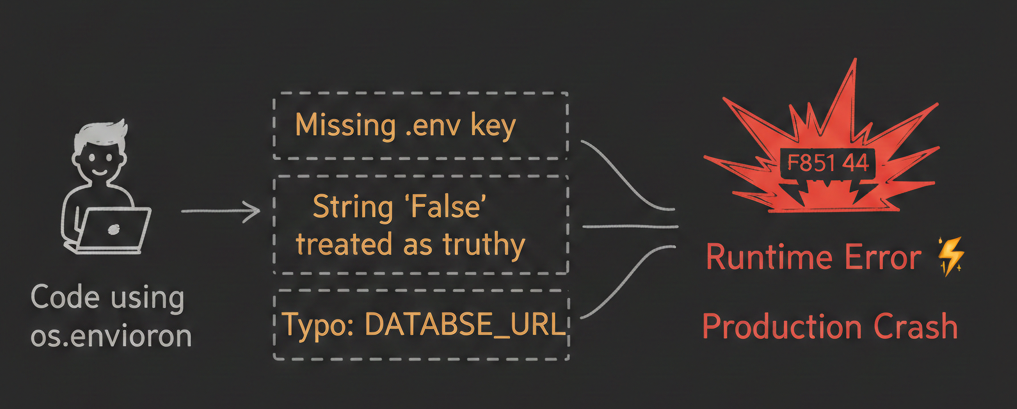
Figure 1: Without validation, configuration errors often surface only during runtime.
The cost of getting it wrong
A single misconfigured environment variable can take down services, expose secrets, or corrupt data. Validation isn't optional—it's your first line of defense.
The 'Why': Conceptual Overview (Beginner)
Before diving into code, let's align on what we are solving.
An Environment Variable is a dynamic value that can affect the way running processes will behave on a computer. In Python web development, we use them to store secrets (API keys, Database passwords) and configuration flags (Debug mode, Port numbers).
A .env file is a local text file used during development to simulate these environment variables. It looks like this:
# .env
DATABASE_URL=postgresql://user:pass@localhost/db
DEBUG=True
The Goal: We want to load these values into our Python application safely, ensure they match the expected data types, and validate that nothing critical is missing before the app starts.
Deep Dive: Core Mechanics (Intermediate)
Let's look at the evolution of handling config in Python, from the raw built-ins to type-safe models.
1. The Raw Way: os.environ
This is the built-in standard library approach. It works, but it offers no guardrails.
import os

# ❌ Risky: Returns None if missing, or raises KeyError
db_url = os.environ["DATABASE_URL"]

# ❌ Risky: Everything is a string. "False" is truthy!
debug = os.environ.get("DEBUG", "False")
if debug:  # This is always True because "False" is a non-empty string
enable_debug_mode()test_environ.py", line 3, in <module>
db_url = os.environ["DATABASE_URL"]
~~~~~~~~~~^^^^^^^^^^^^^^^^
File "<frozen os>", line 714, in __getitem__
KeyError: 'DATABASE_URL'import os
# ❌ Risky: Returns default string, but hard to verify in production
db_url = os.environ.get("DATABASE_URL", "DB URL NOT found")
print(f"DB url is : {db_url}")
# Output: DB url is : DB URL not foundThe string trap
In Python, bool("False") returns True because any non-empty string is truthy. This is a classic source of bugs in configuration logic.
2. The Loader: python-dotenv
To read .env files, the community standard is python-dotenv. It parses the file and loads variables into os.environ.
pip install python-dotenvfrom dotenv import load_dotenv
import os
load_dotenv() # Loads .env in the current directory
db_url = os.getenv("DATABASE_URL")How it works: load_dotenv() searches for a .env file and injects its contents into the process's environment variables.
Note:
python-dotenvis primarily a loader. It does not validate types or ensure required fields exist. That's where Pydantic comes in.
3. The Validator: Pydantic Settings
In the modern Python ecosystem (especially with Pydantic v2), configuration should be modeled as a class. The pydantic-settings package combines loading and validation.
pip install "pydantic-settings>=2.0"from pydantic_settings import BaseSettings, SettingsConfigDict
from pydantic import Field, HttpUrl, validator
class Settings(BaseSettings):
app_name: str = "MyApp"
database_url: str = Field(..., env="DATABASE_URL") # Required field
debug: bool = False
port: int = Field(default=8000, ge=1, le=65535) # Port range validation
model_config = SettingsConfigDict(
env_file=".env",
env_file_encoding="utf-8",
case_sensitive=False
)
@validator("database_url")
def validate_db_url(cls, v):
if not v.startswith(("postgresql://", "mysql://")):
raise ValueError("Unsupported database protocol")
return v
# Usage: fails fast if config is invalid
try:
settings = Settings()
except ValidationError as e:
print(f"Configuration error: {e}")
exit(1)Why this is better:
| Benefit | Impact |
|---|---|
| Validation | Missing DATABASE_URL raises ValidationError at startup, not runtime |
| Type Casting | "8000" → int(8000), "true" → bool(True) automatically |
| IDE Support | Autocomplete and type hints for all config values |
| Documentation | Your settings class serves as living documentation |
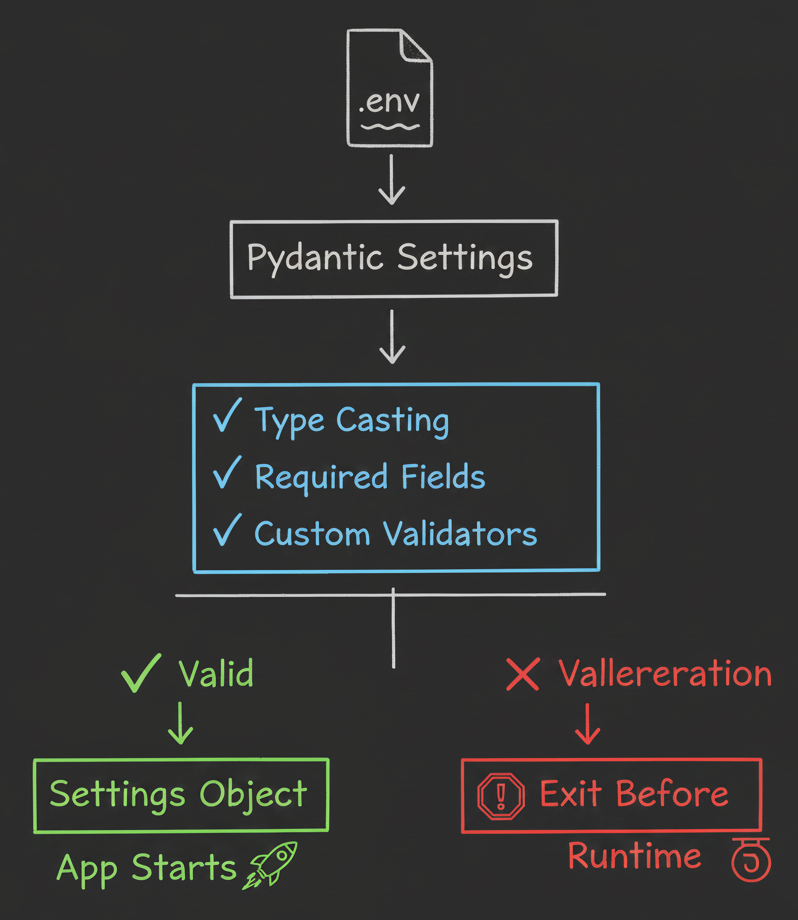
Figure 2: Pydantic intercepts loading to validate types and requirements.
Advanced Patterns & Pitfalls
Once you have the basics, production environments introduce complexity. Here is how senior engineers handle it.
1. Loading Order and Precedence
A common pitfall is misunderstanding where variables come from. pydantic-settings follows this precedence order (highest to lowest):
- ›Explicit arguments passed to the settings class constructor
- ›System Environment Variables (OS level)
- ›
.envfile values (viaenv_fileconfig) - ›Default values defined in the model
Pro tip: Override strategy
This precedence is intentional—it allows CI/CD pipelines to inject production secrets via environment variables that override local .env files without code changes.
2. Security Considerations
from pydantic import SecretStr

class SecureSettings(BaseSettings):
    api_key: SecretStr = Field(..., env="API_KEY")

    model_config = SettingsConfigDict(
        env_file=".env",
        secrets_dir="/run/secrets"  # Docker secrets support
    )

    def get_api_key(self) -> str:
        return self.api_key.get_secret_value()  # Only when needed
Best practices:
- ›Never commit
.env: Add.envto your.gitignoreimmediately. - ›Use
.env.example: Commit a template with dummy values for onboarding. - ›Use
SecretStr: Pydantic masks sensitive values in logs and repr output. - ›Production secrets: Use Docker secrets, Kubernetes Secrets, or cloud secret managers—never
.envfiles in production.
3. Handling Nested Configuration & Prefixes
For complex apps, you might need namespaced settings. Pydantic supports this via env_prefix.
class DatabaseSettings(BaseSettings):
    host: str
    port: int = 5432
    pool_size: int = 10

    model_config = SettingsConfigDict(env_prefix="DB_")

class Settings(BaseSettings):
    db: DatabaseSettings
    redis_url: str

    @classmethod
    def from_env(cls):
        # Load nested settings with prefix handling
        return cls()

# Expects ENV vars: DB_HOST, DB_PORT, DB_POOL_SIZE, REDIS_URL
Tool Integration: evnx and Schema Validation
While Pydantic handles runtime validation, modern DevOps workflows require validation before deployment. This is where specialized tooling like evnx fits into the architecture.
Using evnx to Validate Python Schemas in CI/CD
evnx is a Rust-based CLI tool for validating environment schemas independently of application runtime. This enables "shift-left" configuration validation.
Why validate outside Python?
Catching configuration errors in CI/CD prevents broken builds from reaching production—even if your Python app isn't running yet.
Integration Strategy:
Use evnx in your CI pipeline to lint .env files against a schema definition before deployment.
# .github/workflows/validate-env.yml
name: Validate Environment Schema
on: [push, pull_request]

jobs:
  validate:
    runs-on: ubuntu-latest
    steps:
      - uses: actions/checkout@v4
      - name: Install evnx
        run: curl -fsSL https://dotenv.space/install.sh | bash
      - name: Validate .env against schema
        run: evnx validate --schema config_schema.json --env .env.production
      - name: Check for leaked secrets
        run: evnx scan --pre-commit
Sample config_schema.json for evnx:
{
  "required": ["DATABASE_URL", "API_KEY"],
  "patterns": {
    "DATABASE_URL": "^postgresql://.+",
    "API_KEY": "^sk-[a-zA-Z0-9]{32}$"
  },
  "forbidden_patterns": [
    "your-api-key-here",
    "changeme",
    "localhost"
  ]
}
What evnx catches that Pydantic alone cannot:
$ evnx scan .env.production

[SCAN] Scanning for secrets and anti-patterns...
[ERROR] API_KEY matches placeholder pattern "your-api-key-here"
[ERROR] DATABASE_URL contains "localhost" (invalid for production)
[WARN]  DEBUG=true enabled in production environment
[INFO] 2 errors, 1 warning. Commit blocked.
[TIP] Run `evnx doctor` for remediation steps.
Don't skip pre-commit hooks
A 180ms pre-commit check can save hours of debugging. Configure evnx as a git hook to catch issues before they leave your machine.
Managing Secrets with Remote Vaults
For teams, sharing .env files securely is challenging. Tools like dotenv.space [Conceptual , UPCOMING] provide centralized secret management.
# Example: Loading from remote vault (conceptual)
from pydantic_settings import BaseSettings
from dotenv_space import load_remote_env

# Load secrets from encrypted remote store
load_remote_env(project="my-app", environment="staging")

class Settings(BaseSettings):
    database_url: str = Field(..., env="DATABASE_URL")
    # ... other fields

    model_config = SettingsConfigDict(
        # No local .env file needed in production
        env_file=None
    )
Workflow benefits:
- ›Define schema in Pydantic (single source of truth)
- ›Sync required keys to remote vault
- ›Developers pull via CLI; production pulls via API at runtime
- ›Audit logs track who accessed what, when
Note: When using remote secret managers, ensure your application has least-privilege IAM roles. Never store vault credentials in
.envfiles.
Comparison: Pydantic vs. Alternatives
How does this stack up against other popular configuration libraries?
| Feature | os.environ + dotenv | Pydantic Settings | Dynaconf | python-decouple |
|---|---|---|---|---|
| Type Safety | ❌ None | ✅ Full (Pydantic) | ⚠️ Partial | ⚠️ Manual casting |
| Validation | ❌ Manual | ✅ Automatic + custom | ✅ Custom validators | ❌ Basic |
| Learning Curve | Low | Medium | High | Low |
| IDE Support | ❌ Poor | ✅ Excellent | ⚠️ Good | ⚠️ Fair |
| Secret Handling | ❌ None | ✅ SecretStr | ⚠️ Plugin | ❌ None |
| Best For | Scripts, prototypes | Web APIs, microservices | Complex enterprise apps | Simple Django apps |
Our recommendation
For most modern Python web applications (FastAPI, Django, Flask), Pydantic Settings offers the best balance of safety, DX, and ecosystem support. Augment with evnx for CI/CD validation.
Takeaway & Actionable Advice
- ›Stop using
os.environdirectly. Wrap configuration in a PydanticBaseSettingsclass withField(...)for required values. - ›Fail fast. Ensure your application exits with a clear error on startup if configuration is invalid—never during a request.
- ›Validate early. Integrate
evnxor similar tools into CI/CD to catch schema drift and leaked secrets before deployment. - ›Secure secrets properly. Use
.envfor local development only. Use secret managers, Docker secrets, or cloud injection for production. - ›Document your schema. Your Pydantic settings class is documentation—keep it updated and share
.env.examplewith your team.
Next Steps
Start small, scale smart
You don't need to refactor everything at once. Pick one service, implement Pydantic Settings, and add a pre-commit hook. Iterate from there.
- ›Refactor today: Audit your current project for
os.environusage and hardcoded secrets. - ›Implement this week: Create a
settings.pymodule usingpydantic-settingswith type hints. - ›Automate next sprint: Add
evnx validateto your CI pipeline andevnx scanas a pre-commit hook. - ›Read further:
By treating configuration as typed, validated code—not just strings in the environment—you eliminate an entire class of runtime bugs and security vulnerabilities. Your future self (and your on-call schedule) will thank you.
You're ready
Your configuration is now type-safe, validated at startup, and protected in CI/CD. Ship with confidence.