Rust CLI Apps: Mastering dotenvy, std::env, and Compile-Time env!
A deep dive into environment variable management in Rust. Learn when to use std::env, dotenvy, env!, and how to build type-safe config structures that scale from local dev to production.
Ajit Kumar
Creator, evnx
Configuration management is one of those tasks that seems trivial until it isn't. Hardcoding API keys, mixing up staging and production database URLs, or panicking because a variable wasn't set at runtime—these are the bugs that keep engineers up at night.
In the Rust ecosystem, we have multiple ways to handle environment variables: the standard library's std::env, the popular dotenvy crate, and the compile-time env! macro. Choosing the right one depends on whether you need runtime flexibility, build-time guarantees, or developer ergonomics.
In this post, we'll deep dive into these mechanisms, explore type-safe patterns, and look at how tools like evnx and dotenv.space are changing the workflow. We'll also verify a common myth: do popular Rust web frameworks actually require env files?
The Problem Statement
Why does this matter? In modern cloud-native development (think 12-Factor App methodology), code should be strictly separated from config.
- ›Security: Secrets (API keys, DB passwords) must never be committed to version control.
- ›Portability: The same binary should run in Dev, Staging, and Production, changing behavior only via environment variables.
- ›Developer Experience: Local development should be easy without exporting variables manually every time you open a terminal.
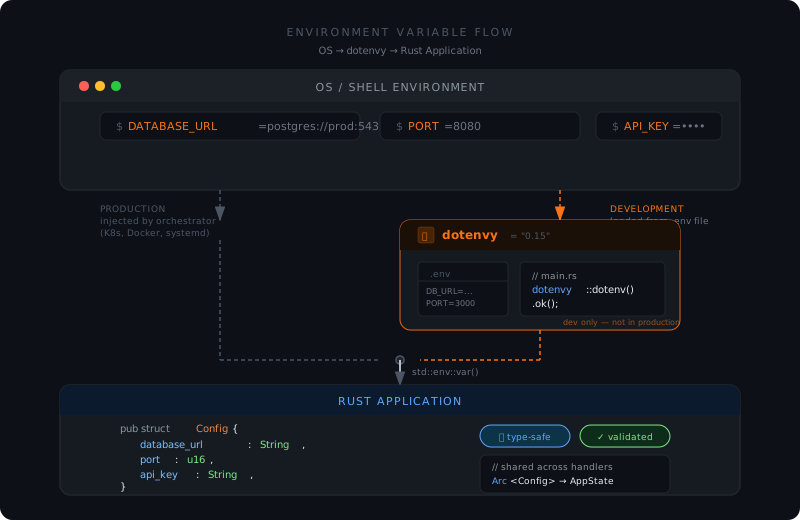 Figure 1: How environment variables flow from OS to Rust application.
12-Factor Reminder
The third factor of the 12-Factor App methodology states: "Store config in the environment — an environment is everything that changes between deploys (staging, prod, developer workstations, etc)."
The 'Why': Runtime vs. Compile Time
Before writing code, we need to understand when the variable is resolved.
- ›Runtime (
std::env,dotenvy): The value is read when the program executes. This allows you to change behavior without recompiling. Ideal for database URLs, feature flags, and secrets. - ›Compile-time (
env!): The value is baked into the binary duringcargo build. Changing the value requires a rebuild. Ideal for version numbers, build IDs, or immutable configuration.
Common Mistake
Never use env! for secrets that rotate. If you rotate a secret, you don't want to rebuild every microservice. Use runtime variables for secrets.
Deep Dive: std::env::var vs dotenvy
1. The Standard Library: std::env
Rust's standard library provides access to the process environment. It reads variables that the OS has already injected into the process.
use std::env;

fn main() {
    // Returns Result<String, VarError>
    match env::var("DATABASE_URL") {
        Ok(val) => println!("DB URL: {}", val),
        Err(_) => println!("DATABASE_URL not set"),
    }

    // Or panic immediately if missing (use with caution)
    // let db_url = env::var("DATABASE_URL").expect("DATABASE_URL must be set");
}
Pros:
- ›Zero dependencies.
- ›Works in production environments (Docker, Kubernetes) where env vars are injected by the orchestrator.
Cons:
- ›Does not automatically load
envfiles. - ›Error handling can be verbose if many variables are required.
2. The Developer Helper: dotenvy
During local development, exporting variables manually is tedious. The dotenvy crate (a maintained fork of the original dotenv) loads a env file into the environment before your code runs.
# Cargo.toml
[dependencies]
dotenvy = "0.15"use dotenvy::dotenv;
use std::env;
fn main() {
// Load env file from current directory
if let Err(e) = dotenv() {
eprintln!("Failed to load env file: {}", e);
}
// Now std::env::var can see variables defined in env
let api_key = env::var("API_KEY").expect("API_KEY must be set");
println!("Authenticated with key: {}", api_key);
}Security Critical
Never commit your env file to Git. Add it to .gitignore immediately. Commit a env.example instead with placeholder values.
Compile-Time Constants: The env! Macro
Sometimes you need values that are fixed at build time. Rust provides the env! macro for this. This reads environment variables during compilation, not at runtime.
fn main() {
    // This variable is resolved when you run `cargo build`
    // If APP_VERSION is not set during build, compilation fails.
    const VERSION: &str = env!("APP_VERSION");

    println!("Running version: {}", VERSION);
}
Use Case: CI/CD pipelines often inject build metadata (Git commit SHA, build timestamp) into the binary.
# Bash script in CI
export APP_VERSION=$(git rev-parse --short HEAD)
cargo build
Pro Tip
Combine env! with option_env! for optional compile-time values that won't fail the build if missing.
Advanced Pattern: Type-Safe Environment Management
As a senior engineer, you should avoid scattering env::var calls throughout your codebase. It makes testing hard and lacks validation. Instead, use a Configuration Struct.
We can combine serde, dotenvy, and a bit of manual validation to create a robust config loader.
use serde::Deserialize;
use std::env;

#[derive(Debug, Deserialize)]
pub struct Config {
    pub database_url: String,
    pub port: u16,
    pub debug_mode: bool,
}

impl Config {
    pub fn from_env() -> Result<Self, Box<dyn std::error::Error>> {
        // Load env first
        dotenvy::dotenv().ok();

        // Manually construct to handle parsing errors gracefully
        let config = Config {
            database_url: env::var("DATABASE_URL")?,
            port: env::var("PORT")?.parse()?,
            debug_mode: env::var("DEBUG_MODE").unwrap_or("false".to_string()).parse()?,
        };

        Ok(config)
    }
}

fn main() {
    match Config::from_env() {
        Ok(cfg) => println!("Starting server on port {}", cfg.port),
        Err(e) => eprintln!("Configuration error: {}", e),
    }
}
Why this is better:
- ›Single Source of Truth: All required variables are defined in one struct.
- ›Validation: Types ensure
PORTis actually a number. - ›Dependency Injection: You can pass the
Configstruct into your app state, making unit testing trivial (no need to mock environment variables).
 Figure 2: Encapsulating environment variables into a single Config struct.
Case Study: Building evnx and Dogfooding Rust
Let's look at how tools designed to manage environment variables, like evnx, handle their own configuration. This concept is known as dogfooding—using your own product to build itself.
The evnx Approach
evnx is a CLI tool designed to synchronize and manage environment variables across teams. When building a tool like evnx in Rust, you face a paradox: How do you configure the tool that manages configuration?
- ›Bootstrap Config:
evnxusesstd::envfor critical secrets (like authentication tokens for its own API) to avoid circular dependencies. - ›Local Development: It utilizes
dotenvyto allow contributors to run the CLI locally without complex export scripts. - ›Integration with
dotenv.space: Tools likedotenv.spaceprovide a UI for managing secrets. In a Rust integration, you might fetch secrets at runtime via an API rather than loading a file.
// Hypothetical integration pattern for evnx/dotenv.space
async fn fetch_secure_config(client: &ApiClient) -> Result<Config> {
    // Fetch encrypted env vars from dotenv.space
    let secrets = client.get_secrets("production").await?;

    // Inject into process environment temporarily or map to struct
    let config = Config {
        database_url: secrets.get("DB_URL").clone(),
        // ...
    };

    Ok(config)
}
This pattern shifts security left: secrets never touch the disk as plain text env files; they are streamed into memory at runtime.
Dogfooding Benefits
By using dotenvy and std::env in evnx itself, the team catches configuration bugs early and ensures the tool works across different environments before shipping to users.
Reality Check: Do Rust Web Frameworks Require env?
There is a common misconception that frameworks like Axum, Actix-web, or Rocket automatically load env files.
Verification: No, they do not.
Rust frameworks generally adhere to the principle of explicitness. They expect environment variables to be present in the process environment, but they do not invoke dotenv implicitly.
- ›Axum/Actix: You must manually call
dotenvy::dotenv()in yourmain.rsbefore starting the server. - ›Rocket: Rocket has a specific configuration system (
Rocket.toml) and can read env vars, but it also does not loadenvfiles automatically without a specific feature flag or manual setup.
Production Warning
If you deploy a Rust web app to Docker without calling dotenv() in code, and you rely on variables only defined in a local env file, your production build will fail. Always ensure variables are injected by your container orchestrator (Kubernetes Secrets, Docker --env-file, etc.) in production.
Comparison: Rust vs. The World
How does Rust's approach compare to other ecosystems?
| Feature | Rust (std::env + dotenvy) | Python (os + python-dotenv) | Node.js (processenv + dotenv) |
|---|---|---|---|
| Loading | Manual (dotenv()) | Manual (load_dotenv()) | Manual (require('dotenv').config()) |
| Type Safety | High (Structs + Serde) | Low (Dynamic) | Low (Dynamic) |
| Compile-Time | env! macro available | No (Runtime only) | No (Runtime only) |
| Performance | Zero-cost abstractions | Interpreter overhead | V8 Engine overhead |
Key Takeaway: Rust offers the unique advantage of compile-time validation via env! and strong type safety via serde, which significantly reduces runtime configuration errors compared to dynamic languages.
Advanced Patterns: Security & Production
1. Validation Libraries
For complex applications, consider using the config crate. It allows merging multiple sources (env, .toml, CLI args, remote stores).
2. Secret Management
In production, avoid env files entirely.
- ›AWS: Use IAM Roles and Parameter Store.
- ›Kubernetes: Use Secrets mounted as environment variables.
- ›Tools: Integrate with HashiCorp Vault or
dotenv.spaceto fetch secrets at startup.
3. Performance Optimization
Loading environment variables is cheap, but parsing them repeatedly is not.
- ›Anti-Pattern: Calling
env::var("PORT")inside a request handler. - ›Pattern: Load once at startup into an
AppStateorConfigstruct and share it viaArc.
use std::sync::Arc;

#[derive(Clone)]
pub struct AppState {
    pub config: Arc<Config>,
}
Benchmarking Tip
Use cargo bench to measure the overhead of your config loading strategy. In most cases, loading once at startup adds under 1ms to cold start time.
Conclusion and Takeaways
Managing environment variables in Rust is a balance between developer ergonomics and production security.
- ›Use
std::envfor production runtime values. - ›Use
dotenvystrictly for local development convenience. - ›Use
env!for build metadata (version, commit hash). - ›Encapsulate your configuration in a type-safe struct using
serde. - ›Remember: Rust web frameworks do not load
envfiles automatically. You must do it explicitly.
By adopting tools like evnx or platforms like dotenv.space, you can streamline the synchronization of these variables across teams, ensuring that what works on your machine works in production.
Next Steps
- ›Refactor: Audit your current Rust project. Are you calling
env::varscattered across modules? Move them to aconfig.rsmodule. - ›Secure: Ensure your
envis in.gitignore. Set up a pre-commit hook to check for secrets. - ›Explore: Check out the
configcrate for more advanced layering strategies.
Ready to Ship?
Add this to your Cargo.toml today:
[dependencies]
dotenvy = "0.15"
serde = { version = "1.0", features = ["derive"] }
Then create a config.rs module and thank yourself later.
Further Reading:
- ›The 12-Factor App Methodology
- ›Rust By Example: Environment Variables
- ›Security Best Practices for Rust Services
- ›evnx Documentation — Open-source CLI for env var management