Zero-Knowledge Cloud Sync: Architecture of Secure Env Storage
A deep dive into client-side encryption, key derivation, and how evnx cloud implements zero-knowledge architecture for environment variables.
Ajit Kumar
Creator, evnx
Zero-Knowledge Cloud Sync: Architecture of Secure Env Storage
We've all been there. It's 2 AM, production is down, and you need to share an API key with a teammate. You copy-paste it into Slack. Or worse, you commit a .env file to a private repo, hoping nobody ever makes it public.
In modern development, secret management is often the weakest link in the security chain. Traditional solutions often rely on server-side encryption, where the provider holds the keys. If the provider is compromised, your secrets are too.
This post explores the architecture behind Zero-Knowledge Cloud Sync, specifically how tools like evnx cloud and dotenv.space implement client-side encryption to ensure the server never sees your plaintext secrets. We'll break down the cryptography, the key derivation, and the practical implementation details.
The Problem: Why Zero-Knowledge?
Before diving into the math, let's establish the threat model.
In a standard SaaS secrets manager (like AWS Secrets Manager or a basic DB-backed store), the architecture looks like this:
- ›Client sends secret over TLS.
- ›Server receives plaintext.
- ›Server encrypts secret with a master key stored on the server.
- ›Server stores ciphertext.
The Risk: If an attacker gains root access to the server, or if the provider is legally compelled to hand over data, they can decrypt your secrets because they hold the decryption keys.
The Zero-Knowledge Solution
In a Zero-Knowledge architecture, encryption happens before the data leaves your machine. The server acts merely as a blind storage bucket for ciphertext.
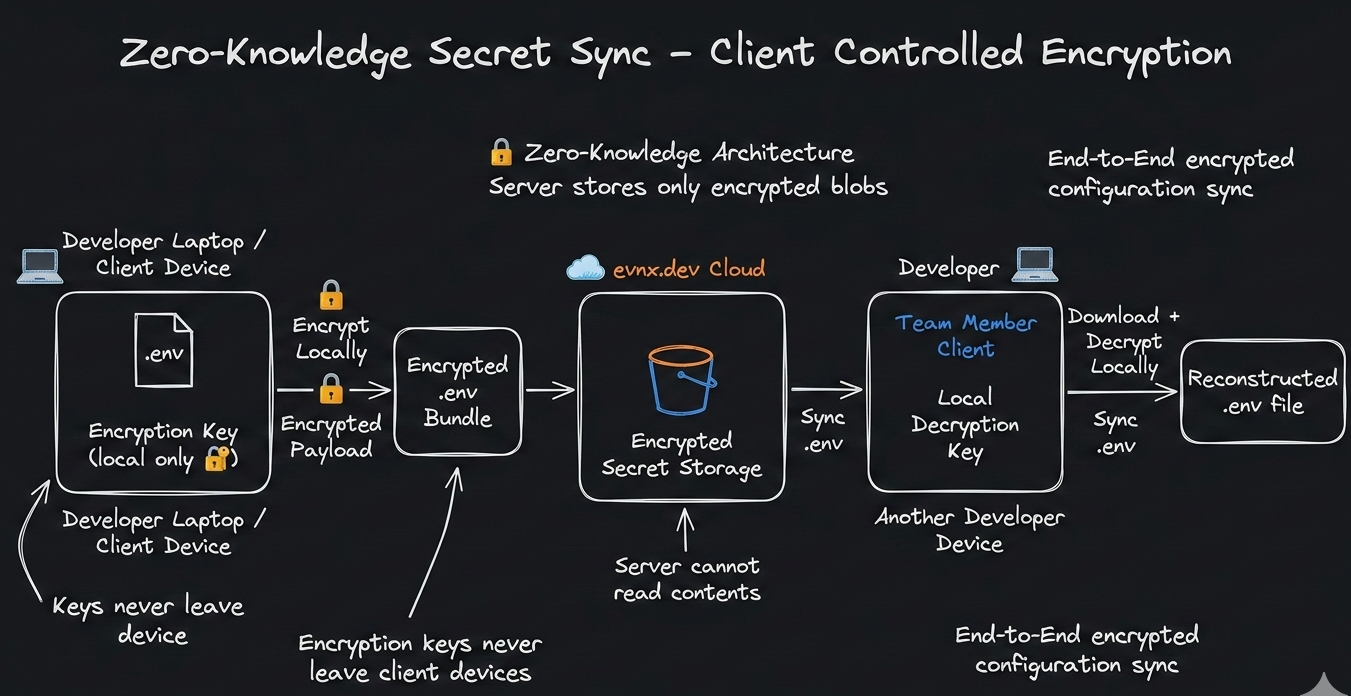
Figure 1: Data flow in a Zero-Knowledge system. Encryption keys never leave the client device.
The Theory: Cryptographic Primitives
To build a secure zero-knowledge system, we need two specific cryptographic primitives: a secure encryption algorithm and a robust key derivation function.
Encryption: XChaCha20-Poly1305
While AES-GCM is the industry standard, it requires careful nonce management. If a nonce is ever repeated with the same key, security collapses.
For client-side encryption where nonces might be generated in diverse environments (browser, CLI, mobile), we prefer XChaCha20.
- ›XChaCha20: A variant of ChaCha20 with an extended nonce (192-bit vs 96-bit). This makes random nonce generation safe without complex state tracking.
- ›Poly1305: Provides authentication (MAC) to ensure the ciphertext hasn't been tampered with.
XChaCha20 is particularly well-suited for JavaScript/TypeScript environments (via WebAssembly) because it avoids timing attacks common in software-based AES implementations.
Key Derivation: Argon2id
Users don't remember 256-bit random keys; they remember passwords. We cannot use a password directly as an encryption key. We need a Key Derivation Function (KDF).
We use Argon2id, the winner of the Password Hashing Competition.
- ›Memory Hard: It requires significant RAM to compute, making GPU/ASIC brute-force attacks prohibitively expensive.
- ›Hybrid: Combines the side-channel resistance of Argon2i and the brute-force resistance of Argon2d.
Deep Dive: How evnx cloud Implements This
Let's walk through the exact lifecycle of a secret within the evnx ecosystem. This flow ensures that even if evnx servers are compromised, your environment variables remain safe.
The Master Password & KDF
When a user signs up for evnx, they create a Master Password. This password never leaves their device.
// utils/crypto.ts
import { argon2id } from '@noble/hashes/argon2';
import { randomBytes } from '@noble/hashes/utils';

export async function deriveMasterKey(password: string, salt: Uint8Array) {
  // Argon2id parameters tuned for security vs. UX balance
  const params = {
    m: 65536, // 64MB memory
    t: 3,     // 3 iterations
    p: 4,     // 4 parallelism
    dkLen: 32 // 256-bit key
  };

  const key = await argon2id(password, salt, params);
  return key;
}
Never store the salt in plaintext alongside the user's email without rate limiting. The salt should be stored on the server to allow login, but the password never travels.
Client-Side Encryption
Before syncing .env data to the cloud, the CLI encrypts the payload locally.
// src/encryption.rs
use chacha20poly1305::{
    aead::{Aead, KeyInit, OsRng},
    ChaCha20Poly1305, Nonce
};

pub fn encrypt_secret(key: &[u8], plaintext: &[u8]) -> Vec<u8> {
    let cipher = ChaCha20Poly1305::new_from_slice(key).unwrap();
    let nonce = Nonce::from(OsRng.gen::<[u8; 12]>());

    // Encrypts and authenticates
    let ciphertext = cipher.encrypt(&nonce, plaintext).unwrap();

    // Prepend nonce to ciphertext for storage
    let mut stored = nonce.to_vec();
    stored.extend_from_slice(&ciphertext);
    stored
}
Blind Sync
The resulting blob (Nonce + Ciphertext + Auth Tag) is sent to evnx cloud. The server stores this blob associated with your project ID. It has no ability to decrypt it because it lacks the masterKey derived in Step 1.
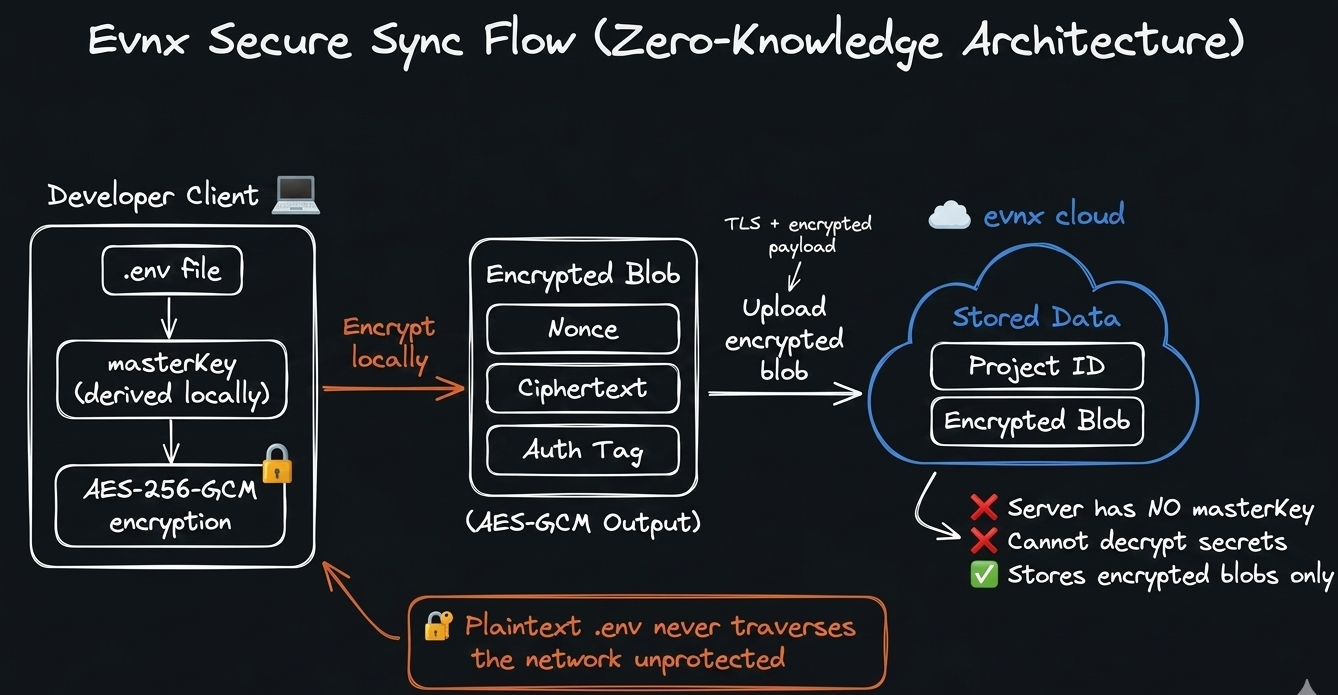
Figure 2: The sync process ensures plaintext never traverses the network unprotected.
$ evnx push --project=prod-api✔ Encrypting 24 variables with XChaCha20-Poly1305✔ Uploading encrypted payload (4.2 KB)✔ Sync complete — server stores ciphertext only
Advanced Patterns & Security Considerations
Implementing zero-knowledge encryption is just the start. Production environments introduce complexity around sharing, rotation, and recovery.
Secure Secret Sharing
How do you share a secret with a teammate if the server can't read it? You use Public Key Cryptography.
- ›Each user has an Ed25519 keypair.
- ›The public key is stored on the server.
- ›To share a project key, the owner encrypts the project's symmetric key with the teammate's public key.
- ›The teammate uses their private key (locked behind their own Master Password) to decrypt the project key.
This ensures end-to-end encryption even during collaboration.
# Before: Owner's local project key- PROJECT_KEY=symmetric_key_abc123 # After: Shared with teammate (encrypted with their public key)+ PROJECT_KEY_SHARED:+ recipient: teammate@company.com+ encrypted_key: ed25519_encrypted_blob_xyz789
Key Rotation Challenges
In server-side encryption, rotating keys is a database update. In zero-knowledge architectures, key rotation requires re-encryption of all data by the client.
evnx handles this by:
- ›Detecting password changes.
- ›Downloading all ciphertext blobs.
- ›Decrypting locally with the old key.
- ›Re-encrypting with the new key derived from the new password.
- ›Uploading the new blobs.
This operation is bandwidth-intensive. It should be triggered rarely (e.g., only when the user explicitly changes their master password).
Performance Optimization
Cryptography implemented purely in JavaScript often becomes a bottleneck for large .env files (e.g., 1000+ variables). CPU-intensive operations such as key derivation, authenticated encryption, and random nonce generation can introduce noticeable UI latency in browser environments.
Solution: Move the cryptographic core to Rust and expose it via WebAssembly (Wasm).
evnx implements its encryption layer in Rust using well-audited cryptographic crates (e.g., AEAD primitives). The Rust module performs:
- ›Key derivation (e.g., Argon2 / HKDF)
- ›Authenticated encryption (e.g., AES-GCM or ChaCha20-Poly1305)
- ›Nonce generation and integrity verification
This Rust code is compiled to WebAssembly and shipped as a portable crypto engine used by both:
- ›the CLI (native Rust binary)
- ›the Web Dashboard (Wasm module in the browser)
Because the same Rust implementation runs in both environments, encryption behavior remains deterministic, auditable, and consistent across platforms.
Most importantly, this architecture enables zero-knowledge synchronization:
- ›Encryption happens locally in the Rust/Wasm module.
- ›Only the encrypted blob
(nonce + ciphertext + auth tag)is sent to the server. - ›The backend stores the encrypted payload but never receives the decryption key.
- ›Decryption is performed only on the client using the locally derived master key.
This ensures the server cannot read environment variables even if storage is compromised.
Example initialization in the web UI:
// components/EnvEditor.tsx
import { initWasm } from '@evnx/crypto-wasm';

useEffect(() => {
  initWasm().then(() => setReady(true));
}, []);

// Only allow save when crypto module is ready
if (!ready) return <LoadingSpinner />;
With this approach:
- ›Performance approaches native speeds due to Rust execution.
- ›Security benefits from a memory-safe language and audited crypto libraries.
- ›Architecture maintains a zero-knowledge model, ensuring secrets never leave the client in plaintext.
Comparison: Zero-Knowledge vs. Alternatives
How does this architecture compare to other common strategies?
| Feature | Zero-Knowledge (evnx) | Server-Side (AWS Secrets) | Git Commit (.env) |
|---|---|---|---|
| Provider Access | Impossible (Mathematically) | Possible (Admin access) | Possible (Repo access) |
| Breach Impact | Data is useless ciphertext | Secrets exposed | Secrets exposed |
| Recovery | Impossible (Lost password = Lost data) | Admin reset possible | Git history revert |
| Sharing | Complex (Public Key Crypto) | Easy (IAM Policies) | Easy (Copy/Paste) |
| Performance | Slight latency (Client crypto) | Fast | Fastest |
When to use what?
- ›Zero-Knowledge: For high-security startups, compliance-heavy industries (HIPAA/GDPR), and teams that don't trust cloud providers with plaintext data.
- ›Server-Side: For internal tools where convenience outweighs the threat of provider compromise, and you rely heavily on IAM rotation.
- ›Git Commit: Never. There is no scenario where committing secrets to version control is acceptable.
Takeaway & Actionable Advice
Security is not a product; it's a process. Moving to a zero-knowledge architecture like evnx cloud significantly reduces your attack surface, but it requires discipline.
- ›Audit Your Current Flow: If your secrets are in Slack or GitHub, migrate them today.
- ›Protect the Master Password: In a zero-knowledge system, there is no "Forgot Password" button that recovers data. Use a password manager to store your master credential.
- ›Enable MFA: While
evnxdoesn't see your data, protecting account access prevents attackers from deleting your encrypted blobs.
Next Steps
Before you start
- → Node.js 18 or higher
- → An existing
.envfile in your project
Install the CLI
npm install -g @evnx/cliInitialize your project
evnx login
evnx init --zero-knowledge
✔ Authenticated with evnx cloud✔ Created local master key (derived from password)✔ Encrypted and synced .env to cloud
Explore further
- ›Read the libsodium documentation to understand the underlying crypto primitives.
- ›Check out our follow-up guide: for implementing secret sharing with ECIES.
- ›Review the command for key rotation workflows.evnx rotate [--force]command--flagMETAVAR[optional]<required>
By shifting encryption to the client, we reclaim sovereignty over our data. In an era of frequent breaches, zero-knowledge isn't just a feature—it's the future of secure development.
Pro Tip: Use evnx scan before every push to catch accidentally exposed secrets in your local .env files before they ever leave your machine.